
Crop Video to 9:16 on iPhone
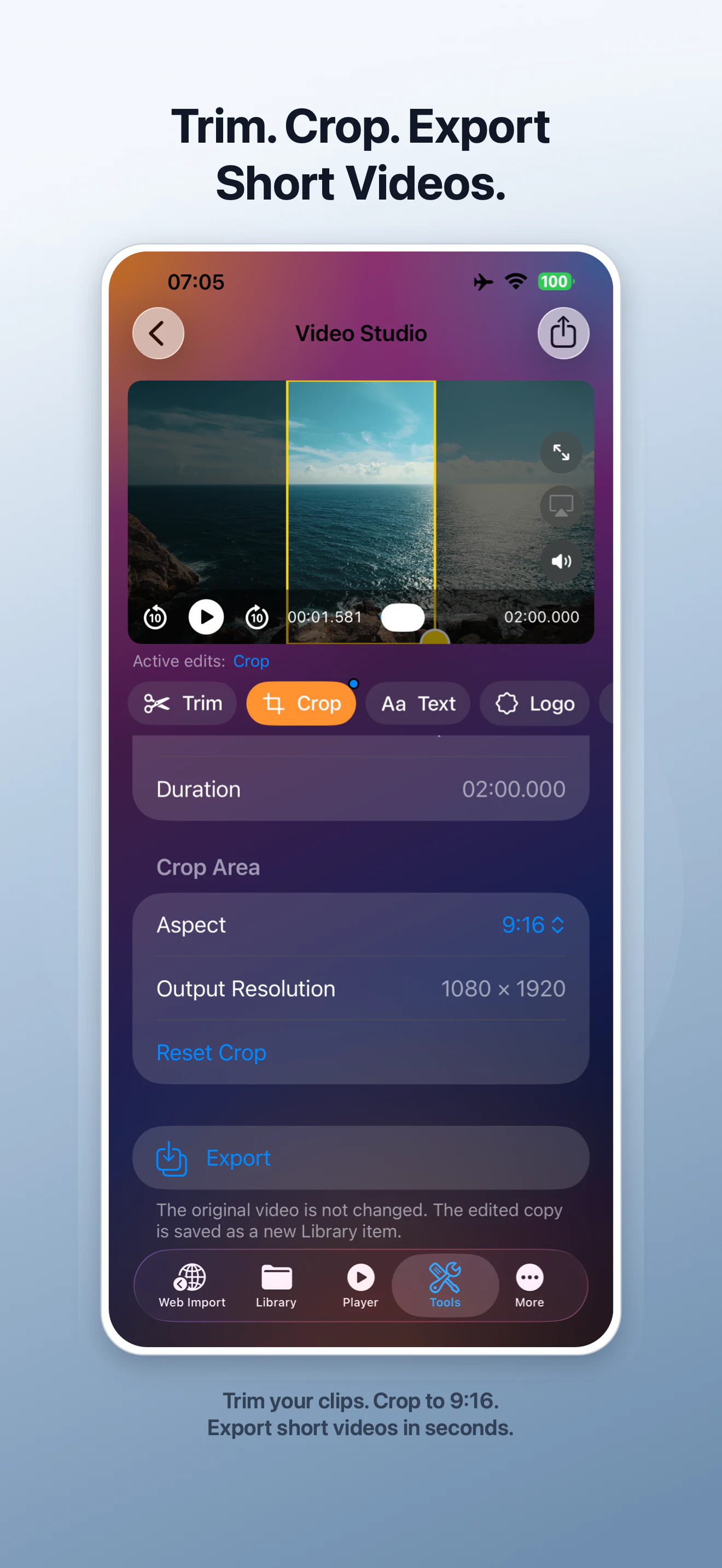
VideoVault Video Studio can crop a local video to 9:16 for a vertical frame while keeping the original file unchanged. You can combine Crop with Trim, Text, Logo, and Hide Area, then export the result as a new library item. It is a focused mobile workflow for straightforward edits, not a multi-track desktop editor.
Real-world scenarios
Reframe a landscape clip vertically
Place the important subject inside a 9:16 crop when the original includes extra space on both sides.
Prepare a clean short-video draft
Trim the beginning and end, choose 9:16, add a small title or logo, and export a separate copy.
Hide an unwanted area
Use Hide Area for a region that should not appear, then preview the composition before export.
Step-by-step
Open Video Studio
Choose a video from your local library and open it in Video Studio.
Select Crop and 9:16
Choose the Crop tool, select the 9:16 aspect ratio, and position the crop area around the subject.
Add only the edits you need
Optionally Trim the clip, add Text or a Logo, or use Hide Area. Preview the active edits before export.
Export a new copy
Export the edited result to your VideoVault library. The original video remains unchanged.
How VideoVault helps
- Provides a quick 9:16 workflow directly on iPhone or iPad.
- Combines crop, trim, text, logo, and hide-area controls in one studio.
- Preserves the source by saving an edited copy.
- Keeps media processing in the app workflow rather than a developer-operated upload service.
Limits and supported formats
What VideoVault does not do
- Video Studio is part of VideoVault Pro.
- Cropping removes visible content outside the selected frame in the exported copy.
- Very low-resolution source media cannot gain detail through export.
- VideoVault is not a multi-track editor with keyframes or a template marketplace.
Formats
- Video input: MP4, MOV, M4V
- 9:16 example output: 1080 × 1920 when supported by the source and export settings
- Edited result saved as a new local library item
FAQ
Will cropping overwrite my original video?
No. Video Studio exports the edited result as a new library item.
Can I add text and a logo after cropping?
Yes. Video Studio includes Crop, Trim, Text, Logo, and Hide Area controls.
Does VideoVault publish the result for me?
No. Export the local copy, then choose a destination through the iOS share sheet when you are ready.
Related articles
Get VideoVault on the App Store
Play, edit, and organize local video and audio with Private Lists, Video Studio, Audio Tools, and advanced playback. Pro is available monthly, yearly, or as a one-time Lifetime purchase.
App Store listing is being prepared.
Download on the App StoreExplore VideoVault